Oracle Data Transformsの自動化: REST APIによるCI/CDパイプラインの構築 (2026/03/02)
Oracle Data Transformsの自動化: REST APIによるCI/CDパイプラインの構築 (2026/03/02)
投稿者:Elói Lopes | Cloud Solution Architect
Ricardo Morais | Cloud Solution Architect
はじめに
多くのOracleのお客様は、Oracle Data Transforms(ODT)を使用して、データ取り込みおよび変換パイプラインを構築・運用しています。ODTはUIを介して設定することが多く、初期開発には効果的ですが、開発/テスト/本番環境全体にわたる繰り返しのプロモーション、ガバナンスの強化、手動による変更リスクの軽減などが必要となる場合、拡張が困難になることがあります。
一般的な企業要件は、ODTアセット (プロジェクト、接続構成、移行成果物など) を、理想的には標準の CI/CD パイプラインを使用して、制御された方法で環境を通じて推進できる成果物として扱うことです。
本記事では、 REST APIを活用して、 ODTプロジェクトに最新のCI/CDプラクティスを導入する方法について説明します。CI/CDがなぜ重要なのか、統合の仕組み、そして改善の余地がある領域について解説します。また、JenkinsfileとPython自動化スクリプトの実用的なリファレンスも掲載しています(面倒な一行ごとの解説は省きます)。
CI/CD モデルで ODT REST API を使用する理由
CI/CDモデルは、開発/テスト/本番環境全体にわたって、再現性、制御、自動化を実現します。ODT REST APIを使用すると、手動のUI操作に頼ることなく、プログラムでアセットをプロモートおよび操作することで、これらのプラクティスをプロジェクトやワークフローに適用できます。CI/CDのメリットには、以下のようなものがあります。
- 一貫した環境のプロモーション: CI/CD は、環境全体で同じバージョンの移行成果物をプロモーションし、ドリフトや「DEV では動作する」という驚きを軽減します。
- トレーサビリティとロールバック: CI/CD はバージョン管理と承認を使用して自動化と構成の変更を追跡し、API はバージョン管理された移行アーティファクトをエクスポート/インポートして、リリースを再現またはロールバックできるようにします。
- より高速で安全なリリース: CI/CD により手動の手順が削減され、パイプラインの検証ステージが可能になります。また、API によりエクスポート/インポートが自動化され、ジョブ ステータスが公開されて信頼性の高い実行が実現します。
- ガバナンスと運用の統合: CI/CD は承認と認証情報の境界を強制し、API 駆動型実行はオーケストレーション、監視、リリース ワークフローにクリーンに組み込まれます。
ODT は、プロモーション、実行、監視など、標準的なエンタープライズ配信パイプラインとの統合に必要な主要なアクションを REST API で公開するため、CI/CD に最適です。
前提条件
始めるには、次のものが必要です:
- 必要なプラグイン (パイプライン オーケストレーション、資格情報、通知用) と Python 3.8 以上がインストールされた Jenkins 環境。
- OCI 構成のファイル資格情報を含む、ソース環境とターゲット環境用に構成された Jenkins 資格情報。
- OCI テナンシーは、必要に応じて読み取り/書き込みアクセスを許可するオブジェクト ストレージ バケットと IAM ポリシーを使用してセットアップされます。
- ソースおよびターゲットODTインスタンスが起動し、アクセス可能であり、適切なオブジェクト ストレージ接続で構成されています。
統合はどのように機能しますか?
Pythonヘルパーは、ODT/OCIの詳細をパイプラインから除外します。ODTで認証し、適切なオブジェクトストレージ接続を検出し、エクスポート/インポートジョブを開始し、完了を待機します。
def generate_token(host, username, password, db_name, tenant_name, adw_ocid):
url = f"https://{host}/odi/broker/pdbcs/public/v1/token"
payload = {
    "username": username,
    "password": password,
    "database_name": db_name,
    "tenant_name": tenant_name,
    "cloud_database_name": adw_ocid,
    "grant_type": "password"
}
resp = requests.post(url, json=payload)
resp.raise_for_status()
return resp.json()['access_token']
def export_project(host, token, obj_storage_id, project_id, export_file_name):
    url = f"https://{host}/odi/dt-rest/v2/migration/export"
    payload = {
        "objectStorageConnectionId": obj_storage_id,
        "exportFileName": export_file_name,
        "objects": [{"objectId": project_id, "objectType": "Project"}]
    }
    response = requests.post(url, json=payload, headers={'Authorization': f'Bearer {token}', 'Content-Type': 'application/json'})
    response.raise_for_status()
    return response.json()
def check_job_status(host, token, job_id):
    url = f"https://{host}/odi/dt-rest/v2/jobs/{job_id}"
    headers = {'Authorization': f'Bearer {token}'}
    while True:
        response = requests.get(url, headers=headers)
        response.raise_for_status()
        status = response.json()['status']
        print(f"Job {job_id} status: {status}")
        if status in ['SUCCEEDED', 'DONE']:
            return True
        elif status in ['FAILED', 'ERROR']:
            raise ValueError(f"Job {job_id} failed with status {status}")
        time.sleep(10)
def import_project(host, token, obj_storage_id, import_file_name):
    url = f"https://{host}/odi/dt-rest/v2/migration/import"
    payload = {
        "objectStorageConnectionId": obj_storage_id,
        "importFileName": import_file_name,
        "importOption": "OVERWRITE"
    }
    response = requests.post(url, json=payload, headers={'Authorization': f'Bearer {token}', 'Content-Type': 'application/json'})
    response.raise_for_status()
    return response.json()
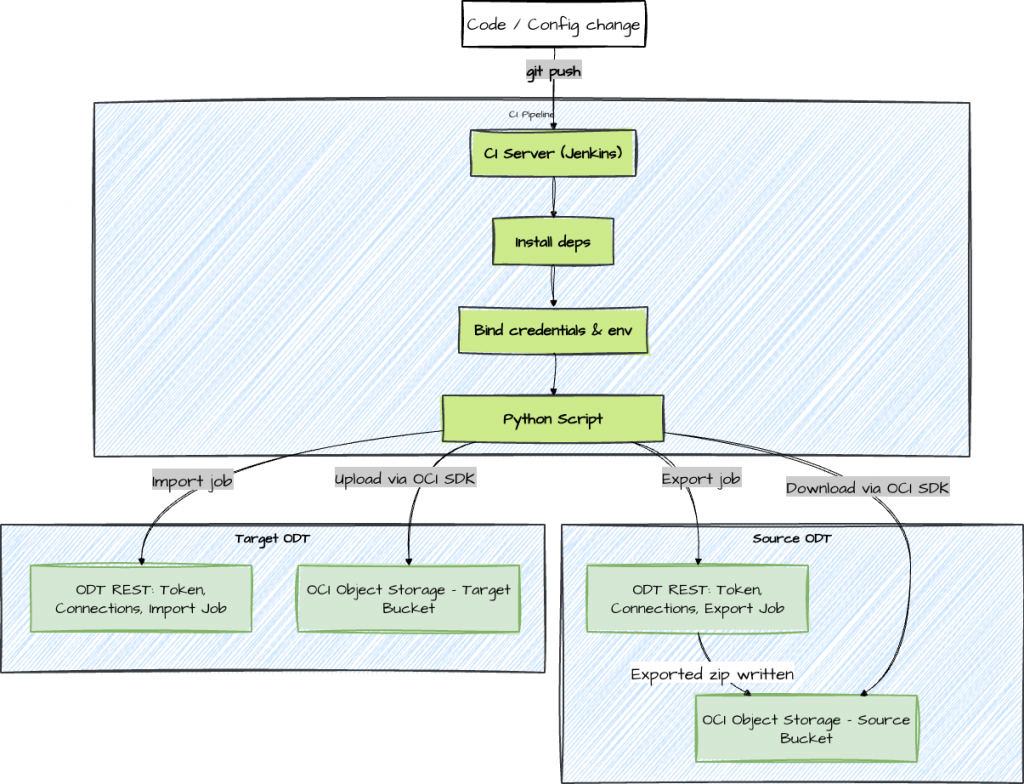
大まかに言えば、この自動化はODTプロジェクトのプロモーションを、制御されたエクスポート → アーティファクト転送 → インポートというワークフローとして扱います。ODT REST APIはエクスポート/インポートジョブの開始と追跡を行い、OCIオブジェクトストレージは移行アーティファクト(プロジェクトZIP)のトランスポート層として使用されます。Jenkinsはオーケストレーション、認証情報の挿入、実行履歴を提供するため、すべてのプロモーションは繰り返し実行可能で監査可能です。自動化されたパイプラインが実際に行う処理の概要は次のとおりです。
- 環境の準備: Python、requests ライブラリ、OCI SDK などの最小限必要な依存関係をインストールします。
- 資格情報の処理: Jenkins システムの資格情報ストアからシークレットと構成値を取得します。
- ODT REST API を呼び出します。ODTの認証トークンを取得し、処理が必要な接続とプロジェクトを検出し、エクスポート ジョブを開始してその進行状況を監視します。
- アーティファクトの移動:エクスポートされたプロジェクト ZIP をソース バケットからダウンロードし、OCI SDKを使用してOCIオブジェクト ストレージ内のターゲット バケットにアップロードします。
def download_from_oci(config, namespace, bucket, object_name, local_path):
    object_storage = oci.object_storage.ObjectStorageClient(config)
    get_obj = object_storage.get_object(namespace, bucket, object_name)
    with open(local_path, 'wb') as f:
        for chunk in get_obj.data.raw.stream(1024 * 1024, decode_content=False):
            f.write(chunk)
def upload_to_oci(config, namespace, bucket, object_name, local_path):
    object_storage = oci.object_storage.ObjectStorageClient(config)
    with open(local_path, 'rb') as f:
        object_storage.put_object(namespace, bucket, object_name, f)
提供されたJenkinsfile はプロセス全体をオーケストレーションし、automate_migration.pyはODTおよび OCIとのやり取りの詳細をカプセル化します。
パイプラインの概要
Jenkinsfileはステージ(事前チェック、エクスポート、転送、インポート)をオーケストレーションし、PythonスクリプトはREST/OCI呼び出しをカプセル化します。実際には、明確な責任分担こそがこのアプローチの保守性を高めています。Jenkinsfileはパイプライン自体、つまりステージの順序付け、資格情報のバインディング、タイムアウト、通知、承認に焦点を当てています。Pythonの自動化は、 API呼び出し、ジョブのポーリング、アーティファクトのダウンロード/アップロードといったODT /OCIの仕組みに焦点を当てています。これにより、問題(パイプラインとサービス/API)のトラブルシューティングが容易になり、 Jenkinsfileをアプリケーションコードに変換することなくソリューションを拡張しやすくなります。
pipeline {
  agent any
  parameters {
string(name: 'PROJECT_ID', defaultValue: '', description: 'Export a specific project (optional)')
  }
  environment {
SOURCE_HOST = '<source-host>'
TARGET_HOST = '<target-host>'
OCI_PROFILE = '<oci-profile>'
NAMESPACE   = '<namespace>'
SOURCE_BUCKET = '<source-bucket>'
TARGET_BUCKET = '<target-bucket>'
  }
  stages {
stage('Checkout') {
  steps {
    git url: 'https://github.com/<user>/OracleDataTransforms ', branch: 'main'
  }
}
stage('Install Dependencies') {
  steps {
    sh 'pip install requests oci'
  }
}
stage('Migrate') {
  steps {
    withCredentials([
      string(credentialsId: 'SOURCE_USER',   variable: 'SOURCE_USER'),
      string(credentialsId: 'SOURCE_PASS',   variable: 'SOURCE_PASS'),
      string(credentialsId: 'SOURCE_DB',     variable: 'SOURCE_DB'),
      string(credentialsId: 'SOURCE_TENANT', variable: 'SOURCE_TENANT'),
      string(credentialsId: 'SOURCE_ADW',    variable: 'SOURCE_ADW'),
      string(credentialsId: 'TARGET_USER',   variable: 'TARGET_USER'),
      string(credentialsId: 'TARGET_PASS',   variable: 'TARGET_PASS'),
      string(credentialsId: 'TARGET_DB',     variable: 'TARGET_DB'),
      string(credentialsId: 'TARGET_TENANT', variable: 'TARGET_TENANT'),
      string(credentialsId: 'TARGET_ADW',    variable: 'TARGET_ADW'),
      file(credentialsId: 'oci-config',      variable: 'OCI_CONFIG_FILE')
    ]) {
      sh '''
        mkdir -p ~/.oci && cp "$OCI_CONFIG_FILE" ~/.oci/config
        export SOURCE_USER SOURCE_PASS SOURCE_DB SOURCE_TENANT SOURCE_ADW
        export TARGET_USER TARGET_PASS TARGET_DB TARGET_TENANT TARGET_ADW
        if [ -n "$PROJECT_ID" ]; then
          python automate_migration.py --project_id "$PROJECT_ID"
        else
          python automate_migration.py
        fi
      '''
    }
  }
}
  }
  post {
always { echo 'Pipeline completed' }
success { echo 'Migration succeeded' }
failure { echo 'Migration failed' }
  }
}</user></target-bucket></source-bucket></namespace></oci-profile></target-host></source-host>
実装には次のような重要な手順が含まれます。
- 開始する前に、サービスが稼働しており、アクセス可能であることを確認します。
- 一時トークンを安全に生成および処理します。
- API を介して適切なオブジェクト ストレージ接続とプロジェクト ID を検出します。
- エクスポート/インポート ジョブをトリガーし、その完了を追跡します。
- 環境間の成果物のダウンロード/アップロードを処理します。
- 完了したら一時ファイルをクリーンアップします。
セキュリティとガバナンスのハイライト
このパイプラインはODTとOCIの両方と連携するため、セキュリティは資格情報を安全に保存するだけではありません。ログ記録、アクセススコープの設定、昇格制御も含まれます。目標は、手動実行よりも自動化を安全にすることです。つまり、人的介入を減らし、機密情報の漏洩を防ぎ、変更時のトレーサビリティを明確にすることです。
セキュリティは全体を通じて最優先事項です。
- 資格情報の管理:秘密情報 (ユーザー名やパスワードなど) は常に実行時に挿入され、リポジトリにハードコードされたりコミットされたりすることはありません。
- 最小権限:パイプライン ユーザーに与えられる権限は、移行の実行とオブジェクト ストレージへのアクセスに必要な権限のみに制限されます。
- 監査証跡:すべての実行がログに記録され、エクスポートされた成果物は不変のレコードとして保持できます。
- 障害処理:迅速なサービス可用性チェックにより、環境にアクセスできない場合にパイプラインが早期に失敗することが保証されます。
def check_service_availability(host, label):
    url = f"https://{host}/odi/dt-rest/v2/connections"  # Using connections endpoint as example; adjust if needed
    print(f"Checking availability for {label} at URL: {url}")
    try:
        response = requests.get(url)
        if response.status_code == 503:
            print(f"{label} service is unavailable (status 503), please resume the instance.")
            exit(1)
        else:
            print(f"{label} service responded with status {response.status_code} (not 503), assuming available.")
            # Proceed without raising, even if not 200
    except requests.exceptions.RequestException as e:
        print(f"Connection Error: {e}")
        print(f"Unable to connect to {label} service at {host}. Please check the host and network.")
        exit(1)
まとめ
CI/CD および REST API を使用してOracle Data Transforms のデプロイメントを自動化すると、リリース パイプラインが大幅に効率化されます。
このリポジトリのJenkinsfileと Python スクリプトは強固な基盤であり、セキュリティとトレーサビリティを最優先にしながら、トークンの取得、成果物の移動、インポート、エクスポート、検証を処理します。
まずはテスト環境でパイプラインを実行し、認証情報と設定を微調整してください。慣れてきたら、承認や監視といった高度な制御機能を追加してください。やがて、データ統合リリースはDevOpsプロセスにおいて、日常的かつ安全で、適切に管理されたプロセスとなるでしょう。
注:エンドポイントパスと必須ペイロードフィールドは、ODTのバージョンとサービス構成によって異なる場合があります。必ずご自身の環境の公式REST APIリファレンスをご確認の上、以下のエンドポイントリストを出発点としてご活用ください。
付録: 主要な ODT REST エンドポイント
- アクセストークンの取得: POST /odi/broker/pdbcs/public/v1/token
- 接続の検出: GET /odi/dt-rest/v2/connections
- プロジェクトの一覧: GET /odi/dt-rest/v2/projects
- エクスポートジョブを開始します: POST /odi/dt-rest/v2/migration/export
- ジョブステータスのポーリング: GET /odi/dt-rest/v2/jobs/{jobId}
- インポートアーティファクト: POST /odi/dt-rest/v2/migration/import
これらの API をパイプラインに統合すると、移行をコードとして扱うことができ、 Oracle Data Transformsをより安全、高速、かつ信頼性の高い方法で配信できるようになります。
参照
Oracle ドキュメント: Oracle データ変換用の REST API
コード例
免責事項
Pythonスクリプト
import requests
import json
import time
import argparse
import os
import oci
from oci.config import from_file

def generate_token(host, username, password, db_name, tenant_name, adw_ocid):
    url = f"https://{host}/odi/broker/pdbcs/public/v1/token"
    payload = {
        "username": username,
        "password": password,
        "database_name": db_name,
        "tenant_name": tenant_name,
        "cloud_database_name": adw_ocid,
        "grant_type": "password"
    }
    print(f"Generating token for URL: {url}")
    # Print full payload except password for debugging
    print(f"Full Payload (password masked): {json.dumps({k: (v if k != 'password' else 'MASKED') for k, v in payload.items()})}")
    response = requests.post(url, json=payload)
    try:
        response.raise_for_status()
    except requests.exceptions.HTTPError as e:
        print(f"HTTP Error: {e}")
        print(f"Response content: {response.text}")
        raise
    return response.json()['access_token']

def list_connections(host, token):
    url = f"https://{host}/odi/dt-rest/v2/connections"
    headers = {'Authorization': f'Bearer {token}'}
    response = requests.get(url, headers=headers)
    response.raise_for_status()
    return response.json()

def get_object_storage_conn_id(connections):
    for conn in connections:
        if conn['connectionType'] == 'ORACLE_OBJECT_STORAGE':
            return conn['connectionId']
    raise ValueError("No Object Storage connection found")

def list_projects(host, token):
    url = f"https://{host}/odi/dt-rest/v2/projects"
    headers = {'Authorization': f'Bearer {token}'}
    response = requests.get(url, headers=headers)
    response.raise_for_status()
    return response.json()

def export_project(host, token, obj_storage_id, project_id, export_file_name):
    url = f"https://{host}/odi/dt-rest/v2/migration/export"
    payload = {
        "objectStorageConnectionId": obj_storage_id,
        "exportFileName": export_file_name,
        "objects": [{"objectId": project_id, "objectType": "Project"}]
    }
    response = requests.post(url, json=payload, headers={'Authorization': f'Bearer {token}', 'Content-Type': 'application/json'})
    response.raise_for_status()
    return response.json()

def check_job_status(host, token, job_id):
    url = f"https://{host}/odi/dt-rest/v2/jobs/{job_id}"
    headers = {'Authorization': f'Bearer {token}'}
    while True:
        response = requests.get(url, headers=headers)
        response.raise_for_status()
        status = response.json()['status']
        print(f"Job {job_id} status: {status}")
        if status in ['SUCCEEDED', 'DONE']:
            return True
        elif status in ['FAILED', 'ERROR']:
            raise ValueError(f"Job {job_id} failed with status {status}")
        time.sleep(10)

def download_from_oci(config, namespace, bucket, object_name, local_path):
    object_storage = oci.object_storage.ObjectStorageClient(config)
    get_obj = object_storage.get_object(namespace, bucket, object_name)
    with open(local_path, 'wb') as f:
        for chunk in get_obj.data.raw.stream(1024 * 1024, decode_content=False):
            f.write(chunk)

def upload_to_oci(config, namespace, bucket, object_name, local_path):
    object_storage = oci.object_storage.ObjectStorageClient(config)
    with open(local_path, 'rb') as f:
        object_storage.put_object(namespace, bucket, object_name, f)

def import_project(host, token, obj_storage_id, import_file_name):
    url = f"https://{host}/odi/dt-rest/v2/migration/import"
    payload = {
        "objectStorageConnectionId": obj_storage_id,
        "importFileName": import_file_name,
        "importOption": "OVERWRITE"
    }
    response = requests.post(url, json=payload, headers={'Authorization': f'Bearer {token}', 'Content-Type': 'application/json'})
    response.raise_for_status()
    return response.json()

def check_service_availability(host, label):
    url = f"https://{host}/odi/dt-rest/v2/connections"  # Using connections endpoint as example; adjust if needed
    print(f"Checking availability for {label} at URL: {url}")
    try:
        response = requests.get(url)
        if response.status_code == 503:
            print(f"{label} service is unavailable (status 503), please resume the instance.")
            exit(1)
        else:
            print(f"{label} service responded with status {response.status_code} (not 503), assuming available.")
            # Proceed without raising, even if not 200
    except requests.exceptions.RequestException as e:
        print(f"Connection Error: {e}")
        print(f"Unable to connect to {label} service at {host}. Please check the host and network.")
        exit(1)

def main():
    parser = argparse.ArgumentParser(description="Automate migration of Oracle Data Transforms projects.")
    parser.add_argument('--project_id', default=None, help="Specific project ID to export (if not provided, export all)")
    args = parser.parse_args()

    source_host = os.environ.get('SOURCE_HOST')
    target_host = os.environ.get('TARGET_HOST')
    if not source_host or not target_host:
        raise ValueError("Missing SOURCE_HOST or TARGET_HOST environment variables.")

    print("Checking service availability...")
    # Check service availability
    check_service_availability(source_host, "Source")
    check_service_availability(target_host, "Target")
    print("Service availability check completed.")

    print("Loading environment variables...")
    # Load sensitive info from environment variables
    source_user = os.environ.get('SOURCE_USER')
    source_pass = os.environ.get('SOURCE_PASS')
    source_db = os.environ.get('SOURCE_DB')
    source_tenant = os.environ.get('SOURCE_TENANT')
    source_adw = os.environ.get('SOURCE_ADW')
    target_user = os.environ.get('TARGET_USER')
    target_pass = os.environ.get('TARGET_PASS')
    target_db = os.environ.get('TARGET_DB')
    target_tenant = os.environ.get('TARGET_TENANT')
    target_adw = os.environ.get('TARGET_ADW')


    if not all([source_user, source_pass, source_db, source_tenant, source_adw,
                target_user, target_pass, target_db, target_tenant, target_adw]):
        raise ValueError("Missing required environment variables for credentials.")

    oci_profile = 'ATEAMCPT'
    oci_config = from_file(profile_name=oci_profile)
    namespace = 'idprle0k7dv3'
    source_bucket = 'BucketToDelete'
    target_bucket = 'BucketFiles'

    print("Generating tokens...")
    source_token = generate_token(source_host, source_user, source_pass, source_db, source_tenant, source_adw)
    target_token = generate_token(target_host, target_user, target_pass, target_db, target_tenant, target_adw)
    print("Tokens generated.")

    print("Retrieving object storage connection IDs...")
    source_conns = list_connections(source_host, source_token)
    source_obj_id = get_object_storage_conn_id(source_conns)
    target_conns = list_connections(target_host, target_token)
    target_obj_id = get_object_storage_conn_id(target_conns)
    print("Connection IDs retrieved.")

    print("Determining projects to export...")
    # Get projects to export
    if args.project_id:
        projects = [{'projectId': args.project_id, 'name': args.project_id}]
    else:
        projects = list_projects(source_host, source_token)
    print(f"Projects to export: {[p['projectId'] for p in projects]}")

    for proj in projects:
        proj_id = proj['projectId']
        proj_name = proj.get('name', proj_id)
        export_name = f"{proj_name}.zip"
        print(f"Processing project: {proj_name} ({proj_id})")

        print("Starting export...")
        export_resp = export_project(source_host, source_token, source_obj_id, proj_id, export_name)
        job_id = export_resp['jobDTO']['jobId']
        export_file = export_resp['exportFileName']  # Timestamped name
        print(f"Export job started: {job_id}, file: {export_file}")

        print("Polling export job status...")
        check_job_status(source_host, source_token, job_id)
        print("Export job completed.")

        # Download from source OCI
        local_zip = f"/tmp/{export_file}"
        print(f"Downloading from source OCI: {export_file} to {local_zip}")
        download_from_oci(oci_config, namespace, source_bucket, export_file, local_zip)
        print("Download completed.")

        # Upload to target OCI
        print(f"Uploading to target OCI: {local_zip} to {export_file}")
        upload_to_oci(oci_config, namespace, target_bucket, export_file, local_zip)
        print("Upload completed.")

        # Import to target
        print("Starting import...")
        import_resp = import_project(target_host, target_token, target_obj_id, export_file)
        # Assuming import response has jobDTO similar to export
        import_job_id = import_resp.get('jobDTO', {}).get('jobId')
        if not import_job_id:
            raise ValueError("Import job ID not found in response")
        print(f"Import job started: {import_job_id}")

        print("Polling import job status...")
        check_job_status(target_host, target_token, import_job_id)
        print("Import job completed.")

        # Clean up local file
        print(f"Cleaning up local file: {local_zip}")
        os.remove(local_zip)
        print("Cleanup completed.")

    print("Migration completed successfully.")
    exit(0)

if __name__ == "__main__":
    main()
Jenkinsファイル
pipeline { agent any parameters { string(name: 'PROJECT_ID', defaultValue: '', description: 'Specific project ID to export (leave blank to export all)') } environment { SOURCE_HOST = '<host>.adb.<region>.oraclecloudapps.com' TARGET_HOST = '<host>.adb.<region>.oraclecloudapps.com' OCI_PROFILE = 'DEFAULT' NAMESPACE = '<namespace>' SOURCE_BUCKET = '<source_bucket>' TARGET_BUCKET = '<target_bucket>' } stages { stage('Checkout') { steps { git url: 'https://github.com/<user>/<repo_name>', branch: 'main' } } stage('Install Dependencies') { steps { script { if (isUnix()) { sh 'pip install requests oci' } else { bat 'py -m pip install requests oci' } } } } stage('Migrate') { steps { withCredentials([ string(credentialsId: 'SOURCE_USER', variable: 'SOURCE_USER'), string(credentialsId: 'SOURCE_PASS', variable: 'SOURCE_PASS'), string(credentialsId: 'SOURCE_DB', variable: 'SOURCE_DB'), string(credentialsId: 'SOURCE_TENANT', variable: 'SOURCE_TENANT'), string(credentialsId: 'SOURCE_ADW', variable: 'SOURCE_ADW'), string(credentialsId: 'TARGET_USER', variable: 'TARGET_USER'), string(credentialsId: 'TARGET_PASS', variable: 'TARGET_PASS'), string(credentialsId: 'TARGET_DB', variable: 'TARGET_DB'), string(credentialsId: 'TARGET_TENANT', variable: 'TARGET_TENANT'), string(credentialsId: 'TARGET_ADW', variable: 'TARGET_ADW'), file(credentialsId: 'oci-config', variable: 'OCI_CONFIG_FILE') ]) { script { if (isUnix()) { sh ''' # Copy OCI config if needed cp $OCI_CONFIG_FILE ~/.oci/config export SOURCE_USER=$SOURCE_USER export SOURCE_PASS=$SOURCE_PASS export SOURCE_DB=$SOURCE_DB export SOURCE_TENANT=$SOURCE_TENANT export SOURCE_ADW=$SOURCE_ADW export TARGET_USER=$TARGET_USER export TARGET_PASS=$TARGET_PASS export TARGET_DB=$TARGET_DB export TARGET_TENANT=$TARGET_TENANT export TARGET_ADW=$TARGET_ADW if [ -n "$PROJECT_ID" ]; then python automate_migration.py --project_id $PROJECT_ID else python automate_migration.py fi ''' } else { bat ''' copy %OCI_CONFIG_FILE% %USERPROFILE%\\.oci\\config set SOURCE_USER=%SOURCE_USER% set SOURCE_PASS=%SOURCE_PASS% set SOURCE_DB=%SOURCE_DB% set SOURCE_TENANT=%SOURCE_TENANT% set SOURCE_ADW=%SOURCE_ADW% set TARGET_USER=%TARGET_USER% set TARGET_PASS=%TARGET_PASS% set TARGET_DB=%TARGET_DB% set TARGET_TENANT=%TARGET_TENANT% set TARGET_ADW=%TARGET_ADW% if "%PROJECT_ID%"=="" ( python automate_migration.py ) else ( python automate_migration.py --project_id %PROJECT_ID% ) ''' } } } } } stage('Cleanup') { steps { script { if (isUnix()) { sh 'rm -f /tmp/*.zip' } else { bat 'del /Q %TEMP%\\*.zip' } } } } } post { always { echo 'Pipeline completed' } success { echo 'Migration succeeded' } failure { echo 'Migration failed' } }}</repo_name></user></target_bucket></source_bucket></namespace></region></host></region></host>


コメント
コメントを投稿